
-
- Getting Started
- Record Tabs
- Managing Duplicate Records
- Setting Up Grid Layouts
- Show and Hide Columns
- Key setup steps
- Additional setup steps
- Tips & Tricks
- Pinning Activities
- Bulk update
- Timeline
- Bulk uploading images
- Advanced Filters
- Automated Workflows
- System Admin in CRM
- Search, sort and report
- Calendar View
- Dashboard View
- Using Views
- Import troubleshooting
- List View
- Set up your customers in CRM
- Working with Activities in CRM
- Basic Navigation
- Using the Map View
- Using the Kanban View
- Configuring Dropdown Lists
- Creating New Records
- Open or Edit Existing Records
- View Details on Map Pins
- Syncing Your Accounting System
- Change the Column order
- Setting up your CSV file for Import
- Filter Map Records
- Company Information
- Sorting Records
- Export data
- Filtering Records
- Import Data from Excel or CSV
- Colourise Map Records
- Set Up Security Groups
- Invite Other Users
- Connect Outlook
- Connect to Mailchimp or Campaign Monitor
- Set Up Other Reference Data
- Configure Online Quoting
- View Reports and Dashboards
- Connect Burst SMS
- Viewing Tags
- Adding and Editing Tags
- Sorting and Filtering with Tags
- Jobs, Assets & Service Management
- Manufacturing
- Operations
- Reporting
- Training
- Workflow Management
- Quoting & Selling
Pinning Activities on Timelines
Pinning items on CRM allows for you to manage records more effectively by highlighting key information so that it can be accessed quickly and easily by all Users.
Record Timelines are made up of a series of Activities:
- Notes
- Calls
- Tasks
- Meetings
- Emails
- SMS
When an Activity is pinned, it will appear highlighted towards the top of the Timeline section for all Users.

To pin an Activity, simply click on the Pin Icon. Multiple items can be pinned at a time.
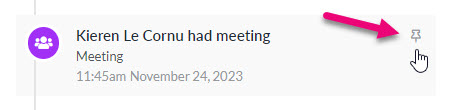
To unpin an Activity, click on the Pin Icon on the desired record to remove it.
Note that this will return it back to its original place within the timeline.
For example: If a Note from November 2023 is pinned, once unpinned it will not return to the top of the timeline, it will return back to its original position in November 2023 on the Timeline.
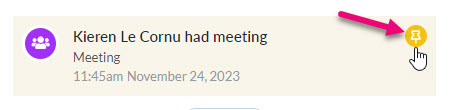
If multiple items are pinned, they will appear in the order of newest to oldest.
You can expand to view the full list of pinned items by clicking on the downwards arrow.
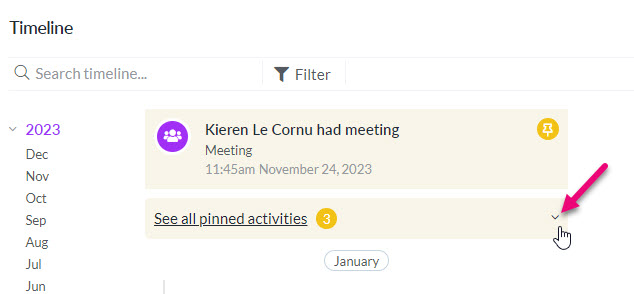
Multiple pinned items nested
Once expanded, you can click the arrow again to contract the group.

Nested pinned items expanded